




- Published on: 2026-10-19 01:46:25
Institutional-Grade Trading Environment: What Retail Traders Should Expect in 2026

“Institutional-grade” should be a standard you can test, not a label you take on trust. A true institutional grade trading environment is defined by how its infrastructure and controls work in practice, not by a polished interface or bold marketing claims. Retail traders don’t need every system built for large institutions, but they do deserve a clear way to judge which capabilities support their own trading.
It’s reasonable to find the term vague. Connectivity, execution quality, risk tools and reporting can sound impressive while leaving their practical benefits unclear. This guide explains what institutional-grade can mean for retail traders in 2026, where its limits are, and how to compare environments using relevant criteria. You’ll also see how trading style and experience can shape your account choice, including the Rookie, Micro, Pro and Scalp tiers, as well as Social Trading and Copy Trading. The aim is to help you choose based on fit, not status.
Key Takeaways
- Judge an institutional grade trading environment by practical capabilities and operational control, not impressive-sounding labels.
- Compare market access, execution, risk controls, usability, and transparency against the needs of your own strategy.
- Understand how liquidity and slippage can affect trades without assuming any broker controls market conditions.
- Use a five-step checklist to define your needs, review risk information, and examine the relevant terms before choosing.
- Choose an account tier based on your trading style and experience, not on status or assumptions about performance.
What Does an Institutional-Grade Trading Environment Actually Mean?
An institutional-grade trading environment is designed around capability, reliability, access, and operational control. In practice, look past the interface to the functions behind it: how orders are handled, what information is available, which risk controls are provided, and how clearly the environment explains its processes. There is no single universal checklist every platform must meet to use the label.
Institutional clients and retail traders operate in different contexts. An institutional investor, such as an organization investing on behalf of clients or members, may coordinate trades across teams, manage large orders, and handle complex reporting and operational workflows. Individual traders usually need a more direct setup for placing and monitoring their own trades. Retail environments may offer selected professional-style capabilities, but similar terminology alone doesn’t prove equivalent access, services, or market role.
An institutional-grade trading environment is one whose specific capabilities support professional workflows and can be assessed against a trader’s needs, not a regulated certification or promise of results.
Institutional infrastructure versus a retail trading environment
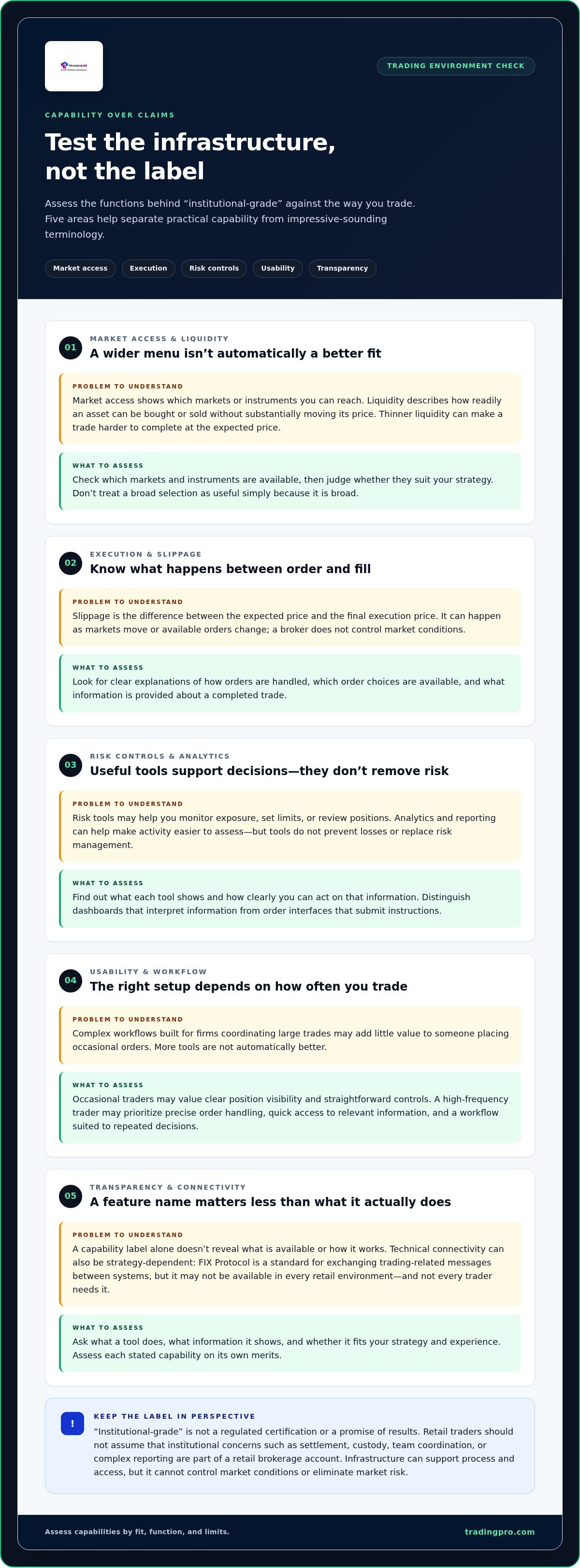
Institutions may need connected systems for trading, execution oversight, reporting, and coordination across teams. Settlement, the process of completing a transaction, and custody, the safekeeping of assets, can also be important institutional concerns. Don’t assume these are part of a retail brokerage account. A retail trader’s practical priorities may instead be understanding order handling, available account information, and controls relevant to their own activity.
What the institutional-grade label can and cannot tell you
The label may signal an aim to provide advanced capabilities, but it doesn’t tell you which functions are available or how they work. Replace prestige language such as “elite” or “world-class” with concrete questions: What does the tool do? What information does it show? Does it fit your strategy and experience? Assess each stated capability on its own merits.
Consider a trader who places occasional orders and wants a clear view of their positions. A complex workflow designed for a firm coordinating large trades may add little value. A more active trader could have different requirements, but sophisticated tools still take knowledge to use appropriately. Fit matters more than status.
Infrastructure can support process and access, but it can’t control market conditions. Prices can move, liquidity can vary, and an order may not execute at the expected price. Advanced tools don’t eliminate market risk or guarantee trading results. Treat the label as a prompt to investigate, then assess the actual functions and their limits against the way you trade.
Which Capabilities Shape an Institutional-Grade Trading Environment?
Evaluate the functions behind the label, then decide whether each one solves a real problem for your trading. A useful framework covers five areas: market access, execution, risk controls, usability, and operational transparency. Together, they help you assess what an institutional grade trading environment offers without confusing a long feature list with a better fit.
Market access, liquidity, and execution quality
Market access describes which markets or instruments a trader can reach through an environment. Liquidity is how readily an asset can be bought or sold without substantially moving its price. When liquidity is thinner, a requested trade may be harder to complete at the expected price. Slippage is the difference between the expected price and the final execution price. It can occur as markets move or available orders change; a broker doesn’t control market conditions.
Assess execution by looking for clear explanations of how orders are handled, which order choices are available, and what information is provided about a completed trade. These are useful questions for evaluating any environment, not assumptions about a specific broker’s performance. For a closer look at the mechanics, see our article on efficient trade execution.
Risk controls, analytics, and connectivity
Risk tools can help traders monitor exposure, set limits, or review positions, while analytics and reporting can make activity easier to assess. Their value depends on what they show and how clearly you can act on that information. They support decisions, but they don’t prevent losses or replace risk management.
Keep the roles of tools distinct. A chart or analytics dashboard helps interpret information; an order interface submits instructions; a trade-management service may act on a trader’s behalf or according to chosen settings. Understand what each tool does before relying on it.
Tools should match the trader, not just the label
A high-frequency trader may prioritize precise order handling, quick access to relevant information, and a workflow suited to repeated decisions. Someone who trades occasionally may value clear position visibility, straightforward controls, and an interface that’s easy to use without constant monitoring. More tools aren’t automatically better.
Picture two traders reviewing the same environment. One needs detailed order information at a glance; the other wants to understand current exposure before placing an occasional trade. Each should judge precision, visibility, and ease of use against their own routine. A feature list matters only when its capabilities fit the trader’s strategy, experience, and practical needs.
Use those criteria to compare your needs with the available options. You can explore TradingPRO account options as part of that decision.
Institutional-Grade Versus Retail Trading: What Should You Compare?
Institutional and retail trading environments serve different operating contexts. The distinction is about workflow, access, and scale, not a ranking of trader skill or a forecast of returns. A retail trader can benefit from robust tools without adopting every process used by a large firm. Compare what each environment is designed to support, then choose according to your own needs.
How institutional and retail needs differ
Institutions may coordinate activity across teams, systems, and accounts, while an individual may make and monitor decisions alone. Position size and complexity also vary, so don’t assume every institution trades large orders or every retail trader uses a simple setup. Operational requirements depend on the participant, the market, and the trading approach.
- Institutional users: May need coordinated workflows, detailed reporting, integrations with internal systems, and processes for handling settlement or custody. Consider which functions support the full workflow and which are handled separately.
- Retail users: May prioritize clear order information, accessible account oversight, and tools suited to individual decision-making. Consider whether the available capabilities fit your strategy without adding unnecessary steps.
- Both: Need to understand how orders are handled and what information is available. Look for the specific provision rather than inferring access or service from institutional-sounding terminology.
Settlement and custody can be central operational concerns for institutions managing assets and transaction processes. They shouldn’t be assumed to describe a retail brokerage account. Similarly, a retail user’s access to selected professional-style tools doesn’t mean they participate directly in markets in the same way as an institutional firm. Distinguish the tool a trader can use from the market role or service behind it.
When professional-style features are useful to retail traders
Professional-style features are useful when they address a real need. Reporting can help a trader review activity; risk information can make exposure easier to understand; and multi-asset oversight may help someone following several markets. But a feature that adds screens, settings, or decisions without improving the trader’s process can become a distraction. Keep the test practical: does it help you act with greater clarity?
For example, a trader who checks positions occasionally may value a straightforward overview more than a dense data feed. Someone making frequent, time-sensitive decisions may care more about a focused workflow and clear order information. If execution speed is central to a scalping approach, explore the relevant Scalp Account details alongside the wider requirements of that style.
Use fit, not prestige, as the deciding factor. Evaluate an institutional grade trading environment by how well its capabilities match the task, not by how many features it displays. The right setup is one you can understand and use consistently, without mistaking complexity for an advantage.
How to Evaluate an Institutional-Grade Trading Environment Before Choosing
Use a repeatable fit test before choosing an institutional grade trading environment. Start with what you actually do, then compare each claimed capability with a real trading need. Sophisticated tools can look compelling, but more functions don’t automatically improve decisions or results. If you can’t explain how a feature supports your process, it may be optional rather than essential.
Match the environment to your strategy and experience
Be specific about your routine. Do you trade occasionally, actively monitor positions, follow several asset classes, or use a scalping approach? Your experience matters too. If you’re building foundational knowledge, start with a beginner trading guide before judging advanced tools. Map demonstrated needs to account and tool criteria; don’t choose an environment just because its language sounds prestigious.
Use this five-step checklist
- Define your strategy. Note how often you trade, which markets you follow, and how you make decisions. Keep the description practical, not aspirational.
- Identify required capabilities. List what your routine depends on, such as clear order information, position visibility, or specific analytical functions. Separate essentials from features you might use someday.
- Assess usability. Consider whether you can find key information and understand the steps involved in placing or reviewing a trade. A powerful tool that creates confusion may not serve you well.
- Inspect risk information. Understand how margin applies, how losses may affect your account, and what risk-related information is presented. Tools can support awareness, but they can’t guarantee an outcome or prevent every loss.
- Verify the terms. Read the applicable account terms, including conditions that affect how the account works. Treat claims about protections or regulatory status as jurisdiction-specific, and rely on current, relevant disclosures rather than broad marketing language.
Check transparency and practical relevance
As you compare options, look for explanations that connect each feature to its purpose. Check whether you can understand the information provided and whether the stated capability applies to your trading approach. Don’t treat words such as “advanced” or “professional” as evidence of a particular service, level of access, or protection.
- Essential: A function you need to carry out or oversee your strategy.
- Useful: A feature that improves clarity or helps you review activity.
- Optional: A capability unrelated to your current process or experience.
Keep the test grounded in day-to-day decisions. An occasional trader may not benefit from a complex workflow designed for frequent activity, while a more active trader may need information that’s easy to access and interpret. The goal isn’t to collect the most features. It’s to choose a setup you can use deliberately.
Choose by fit, not prestige: match each capability to your strategy, experience, risk awareness, and account terms. Once you’ve defined those criteria, explore your registration options at your own pace.
How TradingPRO's Account Tiers Fit Different Trading Needs
Account choice is part of building a trading setup that works for you. TradingPRO is a multi-asset brokerage with four account tiers: Rookie, Micro, Pro, and Scalp. Compare them against your strategy and experience, rather than treating them as steps on a ladder where a higher-sounding tier must be better. An institutional grade trading environment is useful only when its capabilities and terms make sense for the way you plan to trade.
Use account tiers as a fit framework, not a status ladder
Start with your practical requirements. A newer trader may consider the Rookie Account as a starting point, while a trader with a distinct approach can compare the Micro, Pro, and Scalp tiers against their priorities. The names alone don’t establish differences in specifications, execution, or suitability. Review the current account terms and specifications before deciding, and weigh each detail against your trading plan.
Make the comparison specific. Write down the markets you intend to trade, how often you expect to place trades, and what information or controls you need to manage your activity. Then compare those needs with the details for each account. Don’t choose a tier simply because it sounds more advanced, and don’t assume one option suits every trader.
Consider Social Trading and Copy Trading as separate capabilities
TradingPRO also offers Social Trading and Copy Trading. These services let users follow or replicate other traders’ strategies, but copying trades doesn’t make trading passive or remove the need to understand the decisions being replicated. Positions remain exposed to market risk, and past or copied activity can’t assure profits. Consider how this approach fits your risk tolerance, involvement, and understanding of the strategy.
Social Trading and Copy Trading may describe related ideas, but the terms can refer to different ways of following and replicating strategies. Before using either, understand what participation involves and which decisions remain yours. For a deeper explanation, consult a guide comparing social trading and copy trading.
Turn your evaluation into a clear next step
Bring your priorities together: strategy fit, relevant capabilities, transparent terms, and a level of complexity you can manage. Then compare the account options using those criteria. If your trading plans change, revisit the fit rather than assuming you need to move up a tier. The right choice aligns with your needs, not a label that suggests status or promises institutional execution.
Ready to take the next step? Register with TradingPRO and choose an account path based on the way you want to trade.
Make Your Next Trading Decision With Confidence
The next step isn’t to chase the most complex setup. Put your priorities into practice: choose tools you understand, keep risk in view, and revisit your setup as your experience and strategy develop. An institutional grade trading environment should support deliberate decisions, not create pressure to trade more or promise outcomes no system can guarantee.
TradingPRO’s Rookie, Micro, Pro, and Scalp account tiers offer different paths to consider, alongside Social Trading and Copy Trading. Focus on which option aligns with your approach, then review its current terms before moving forward. Your account choice should reflect your needs today, not a status label or someone else’s trading style.
Take a considered next step and register with TradingPRO. Build your trading approach with clarity, stay focused on what matters, and move ahead at a pace that fits you.
Frequently Asked Questions
Is “institutional-grade” a regulated or standardized trading term?
The phrase itself doesn’t establish a universal certification or fixed checklist. “Institutional-grade” can describe a range of capabilities, so the wording alone doesn’t tell you what’s available. Compare stated functions, such as order handling or reporting, with the account documentation. Review current disclosures that apply to your account and jurisdiction rather than treating the label as proof of a particular standard.
Can retail traders access an institutional-grade trading environment?
Yes, retail traders may have access to selected professional-style capabilities, but specific access and services depend on the provider and account. For example, an account might offer certain analytical functions without the broader operational arrangements an institution uses. Compare the account terms and available features with your strategy. Access to individual tools doesn’t make you an institutional client or provide every institutional service.
Does an institutional-grade trading environment guarantee better trading results?
No trading environment can guarantee profitable results. Tools may help you review information or organize a workflow, but they can’t determine future market movements or make every decision for you. An analytical feature, for example, may help you spot a pattern, but the trade can still move against you. The phrase describes a claimed environment or capability, not a performance promise. Understand the potential losses before trading.
Does institutional-grade trading mean you own the underlying shares or crypto?
No. The phrase alone doesn’t establish ownership of an underlying asset; the product structure and account terms determine what you hold or trade. Read the relevant product disclosures to understand the arrangement. TradingPRO provides brokerage and trading services, not physical share ownership or cryptocurrency wallet services. Don’t assume a trading account gives you direct ownership of an asset or a wallet for holding digital currency.
Is an institutional-grade environment necessary for a beginner?
No. A beginner doesn’t automatically need a complex toolset. If you’re learning how orders work, a clear setup that lets you understand your activity may be more useful than advanced functions you won’t use. Start by learning the account terms and how potential losses can affect your trading. Add capabilities as your strategy and experience develop, rather than choosing features for their impressive names.
What is the difference between institutional trading infrastructure and institutional-style tools?
Infrastructure means the broader systems and operational services that support an institution’s activity, which may connect trading workflows with reporting, settlement, or custody arrangements. A tool is an individual capability, such as an analytical feature or an order function. A retail account may provide selected advanced tools without matching an institution’s complete infrastructure, custody setup, or market-access arrangements. Compare the specific function, not just its label.


