


Blog
  • Published on: 2026-11-13 15:37:00

How to Change Your Forgotten Password
How to Change Your Forgotten Password

It is a moment of pure panic that happens to everyone: you try to log in to your account, and the password you were sure was correct is suddenly wrong. If you are thinking, "I can't login to my trading account!", take a deep breath. You have come to the right place.

Forgetting your trading login details for your main TradingPRO account (your Client Portal) is a very common issue, and the solution is much simpler than you think. This guide will walk you through the exact steps to reset password access so you can get back to managing your profile in minutes.

The Step-by-Step Guide to Resetting Your Password

Follow these simple visual steps to regain access to your Client Portal.

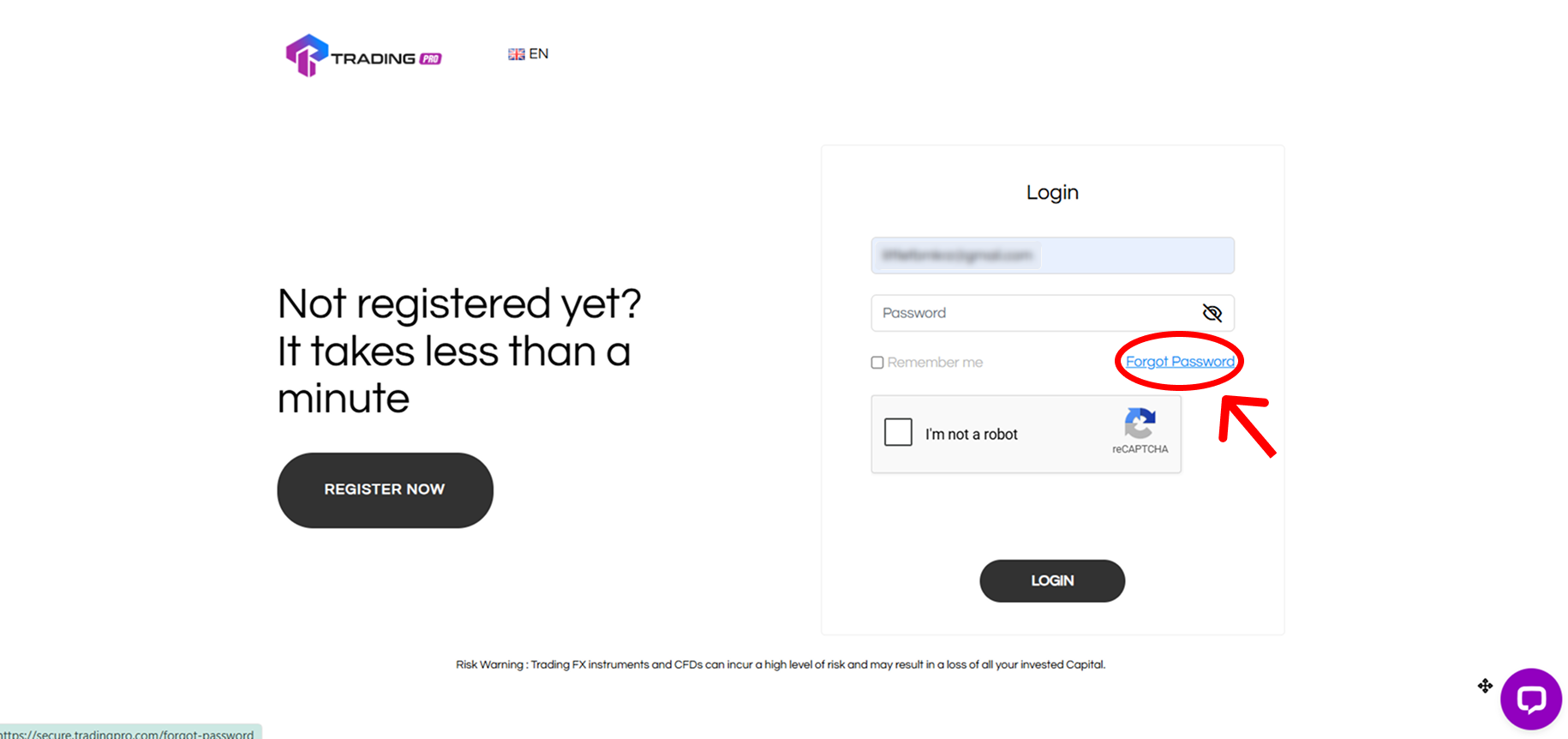
Step 1: Go to the Login Page and Click 'Forgot Password'

First, open the TradingPRO login page on your browser or app. Instead of entering your details, look for and click the "Forgot Password?" link.
How to Change Your Forgotten Password

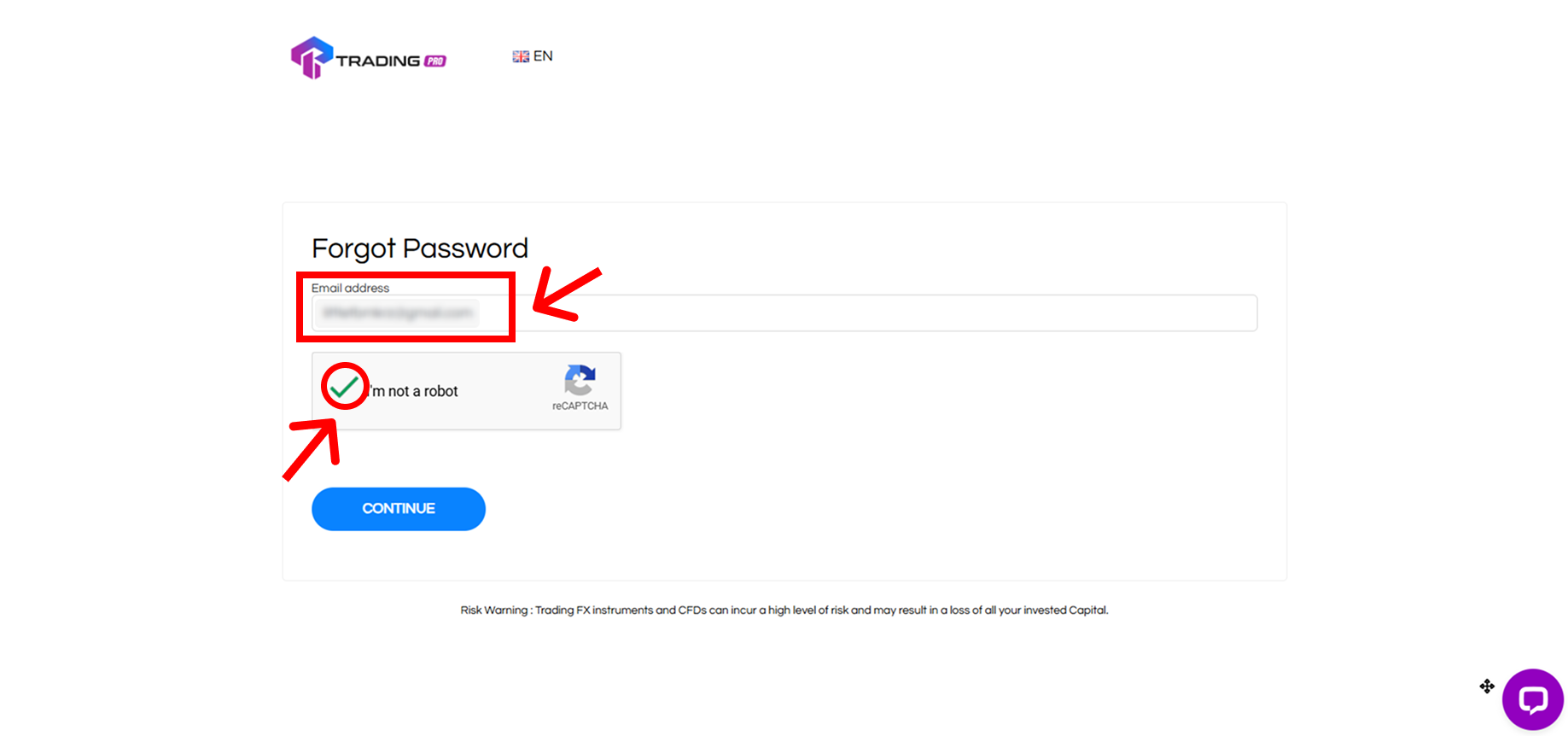
Step 2: Enter Your Registered Email Address

You will be taken to the password recovery page. In the field provided, enter the email address you used to register your TradingPRO account. Then, check the "I'm not a robot" box and click "Continue."
How to Change Your Forgotten Password

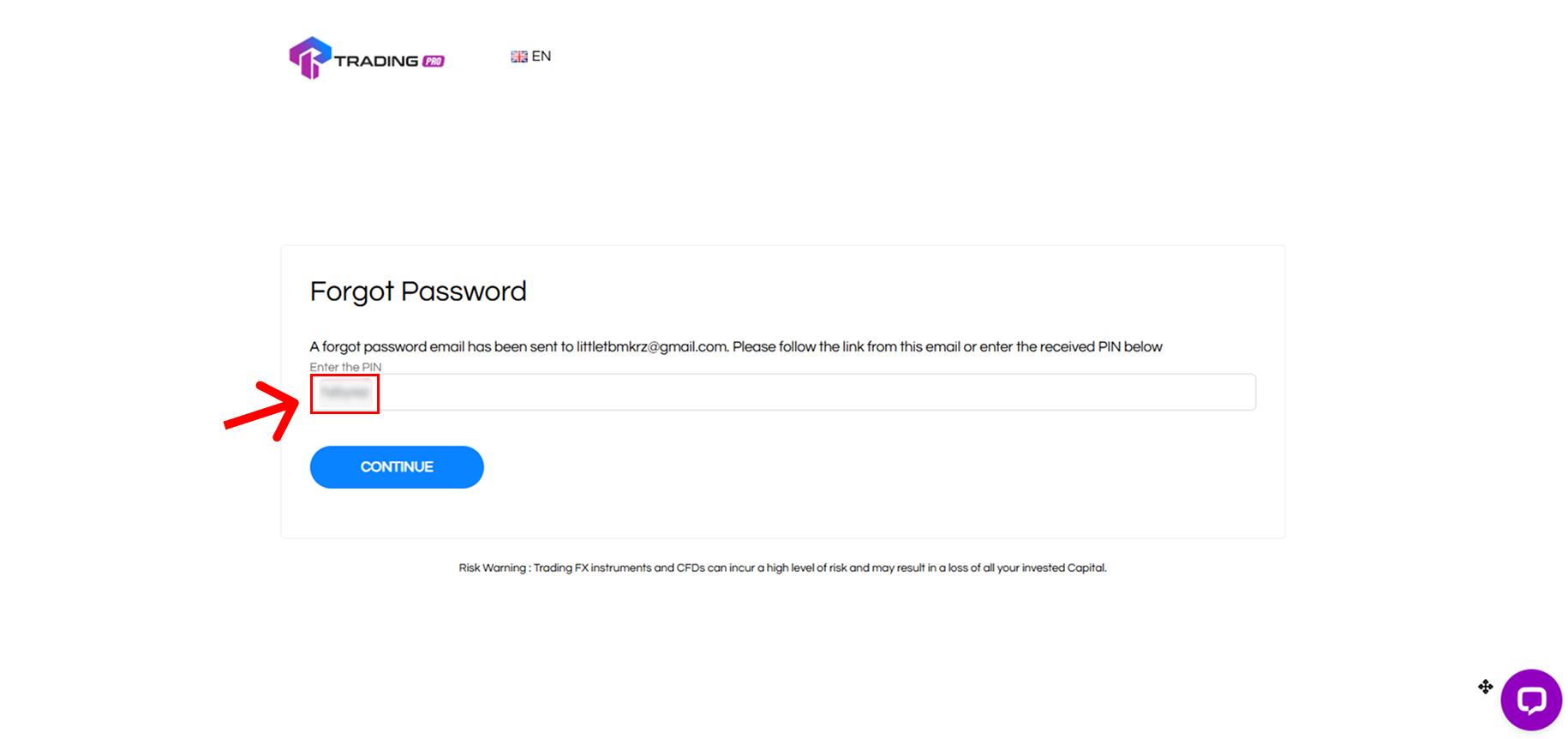
Step 3: Enter the PIN Sent to Your Email

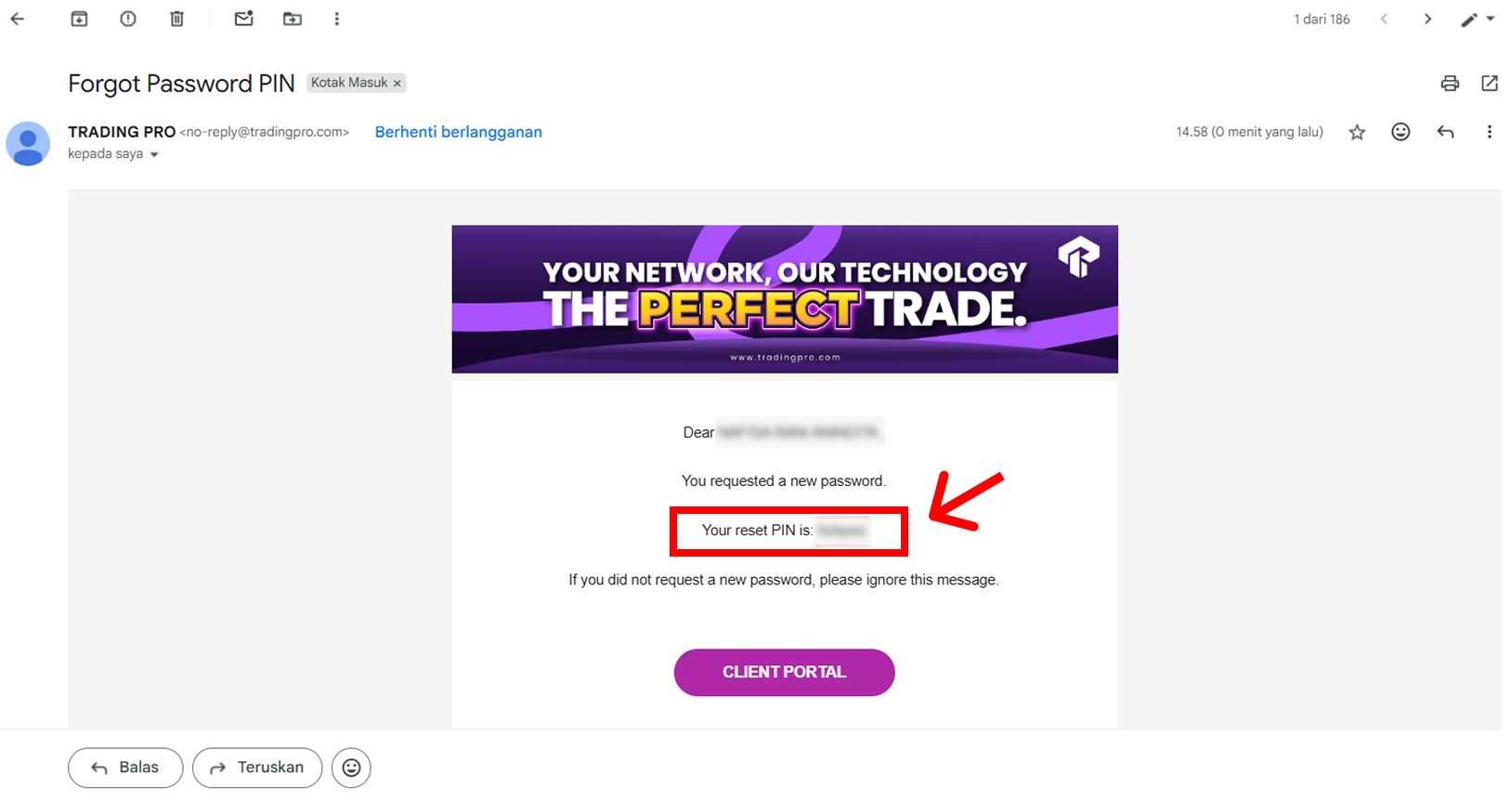
Our system will immediately send a one-time PIN to your registered email address. Check your inbox (and spam folder, just in case) for an email from TradingPRO containing your 6-digit verification code.
How to Change Your Forgotten Password

Now, go back to the password reset page and enter the 6-digit PIN you received. Once entered, click "Continue."
How to Change Your Forgotten Password

Step 4: Create Your New Secure Password

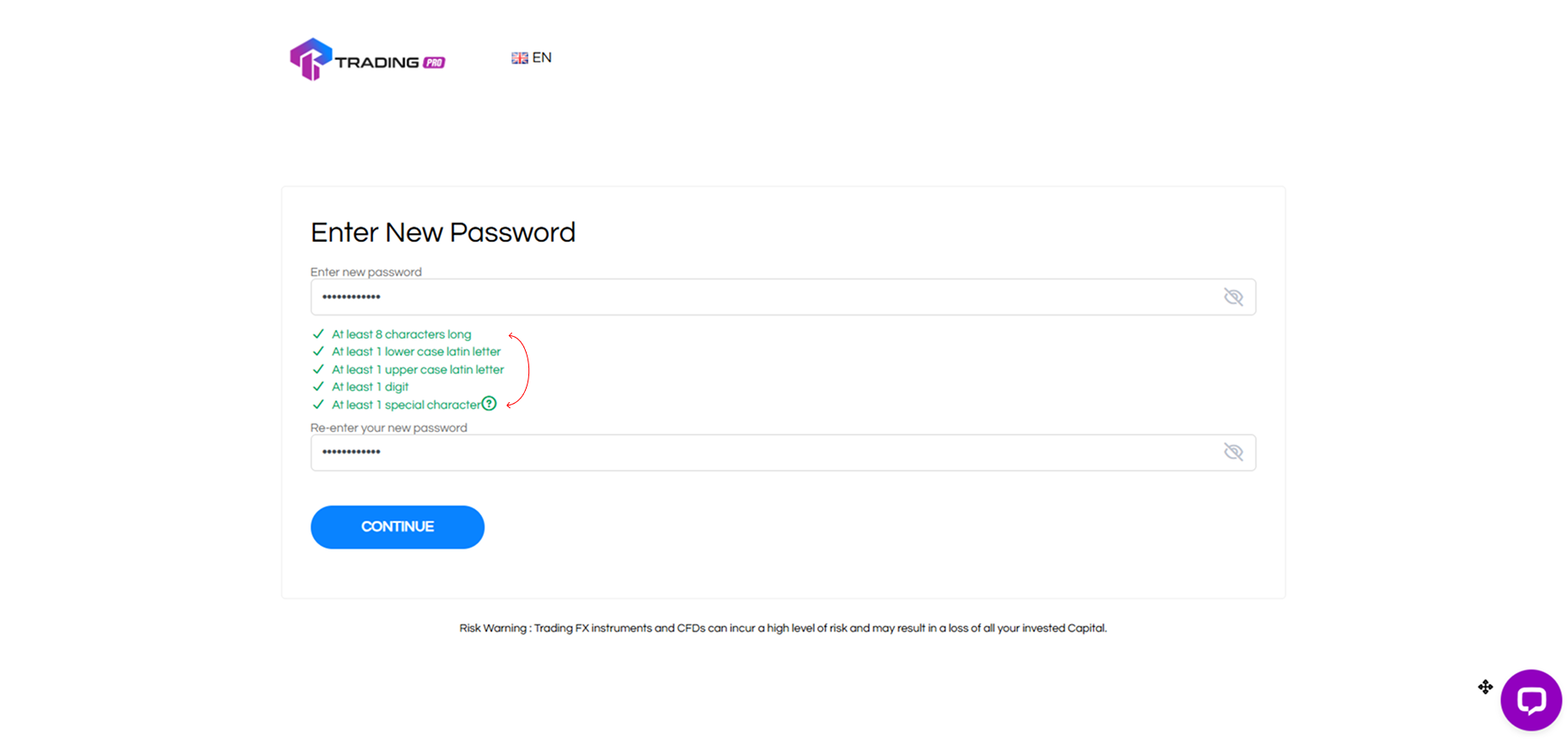
You are now on the final step! Create a new password for your account. To ensure your account is secure, your new password must meet the following criteria:

  • 8 to 15 characters long
  • Contains both uppercase and lowercase letters
  • Contains at least one number

As you type, the requirement indicators will turn green once a condition is met. The "Continue" button will only become active after all requirements are green.
How to Change Your Forgotten Password

Step 5: Log In With Your New Password

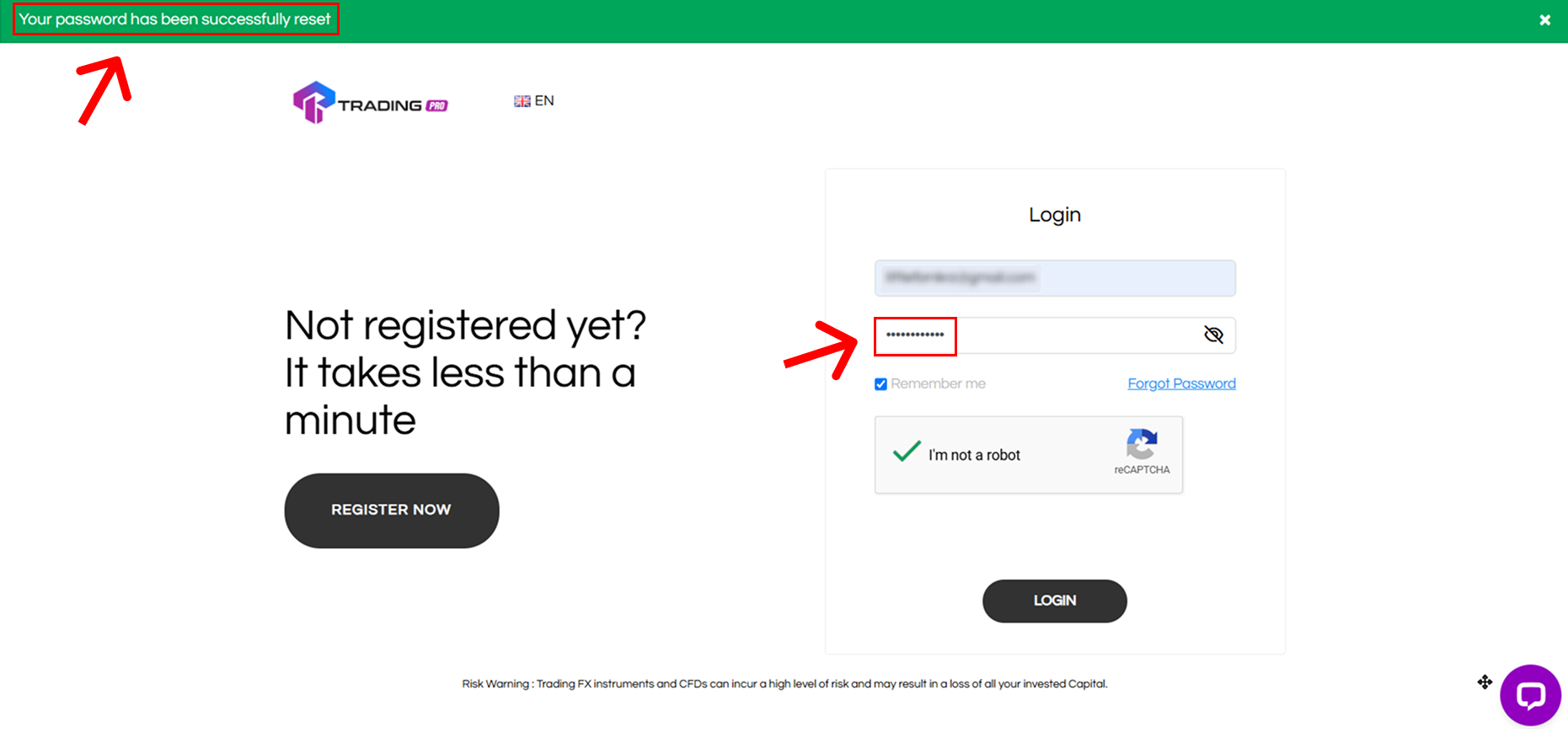
Once you set your new password, you will be automatically redirected back to the login page. You will see a green banner at the top confirming "Your Password has been successfully reset." You will also receive a final confirmation email.
How to Change Your Forgotten Password

Now, you can confidently log in to your Client Portal Login using your email address and your new password!

Still Having Trouble? We Are Here to Help

This process should get you back into your account smoothly. However, if you are still facing issues (for example, you are not receiving the PIN email), our customer support team is available 24/7 to assist you.

Visit Our Help Center for More Guides or Contact Support Directly

Connect with the TradingPRO Community

Stay connected with us for platform updates, security tips, and more:

Join Our Official Social Channels Here!

Makipag-ugnayan sa isang pinagkakatiwalaang broker ngayon

Tingnan para sa iyong sarili kung bakit ang TradingPRO ang napiling broker para sa mahigit 800,000 na mangangalakal at 64,000 na kasosyo.

Trading Pro logo

Mga deposito at withdrawal

Learning

Pag-iwas sa Panloloko


Ang TradingPRO International (PTY) LTD (Numero ng pagpaparehistro 2014​/202132​/07) ay isang Financial Services Provider na pinahintulutan at kinokontrol ng Financial Sector Conduct Authority (FSCA) ng South Africa sa ilalim ng numero ng lisensya FSP No. 49624. Ang nakarehistrong address ay nasa Office 106 1st Floor Pharosville Buckingham Terrace-7000 Pharos 3630

Ang TradingPRO International Limited (Registration number 208079 GBC) ay isang Global Business License sa ilalim ng Seksyon 72 ng Financial Services Act 2001 at isang Investment Dealer (Full Service Dealer, hindi kasama ang Underwriting) License sa ilalim ng Seksyon 29 ng Securities Act 2005 sa ilalim ng awtorisado at kinokontrol ng numero ng lisensya ng mga Serbisyong Pananalapi ng Mauritius25, Mauritius230. Ang nakarehistrong address ay nasa 3rd Standard Chartered Tower, Cybercity, Ebene 72201, Mauritius.

Impormasyon: Ang mga kliyenteng interesadong magparehistro ay dapat na hindi bababa sa 18 taong gulang pataas upang magamit ang serbisyo ng TradingPRO. Para sa mga mangangalakal na gustong magsimula ng pangangalakal, dapat malaman at maunawaan ang mga panganib na kasangkot, kung hindi kasama ang mga posibilidad para makaranas ka ng mga pagkalugi sa hinaharap. Ang isa ay dapat maging maingat kapag gumagamit ng currency market. Hinihikayat ang mga mangangalakal na gamitin ang margin upang masuri ang antas ng kanilang kakayahan.

Babala sa Panganib: Anumang impormasyon o elemento na ginawa para sa mga layunin ng publikasyon, pagkopya, o pagpaparami ay makukuha lamang sa sulat mula sa TradingPRO. Pakitandaan na ang pangangalakal ng forex at pangangalakal sa iba pang mga nagagamit na produkto ay nagsasangkot ng malaking antas ng panganib at hindi angkop para sa lahat ng mamumuhunan. Ang pangangalakal gamit ang mga instrumento sa pananalapi ay maaaring magresulta sa mga kita pati na rin ang mga pagkalugi, at ang iyong mga pagkalugi ay maaaring mas malaki kaysa sa iyong unang namuhunan na kapital. Bago magsagawa ng anumang ganoong mga transaksyon, dapat mong tiyakin na lubos mong nauunawaan ang mga panganib na kasangkot at humingi ng independiyenteng payo kung kinakailangan.

Ang impormasyong ito ay hindi nakadirekta o inilaan para sa pamamahagi sa o paggamit ng mga residente ng ilang partikular na bansa kabilang ang, ngunit hindi limitado sa, Australia, Belgium, France, Iran, North Korea, at USA. Hindi nag-aalok ang Kumpanya ng mga serbisyo nito sa mga residente ng ilang partikular na bansa kabilang ang, ngunit hindi limitado sa, Australia, Belgium, France, Iran, North Korea, at USA. Ang Kumpanya ay may karapatan na baguhin ang mga listahan sa itaas ng mga bansa ayon sa pagpapasya nito.


© 2025 TradingPRO. Lahat ng karapatan ay nakalaan.

Facebook Instagram Threads X TikTok Linkedin Telegram